
Related Fairoaks resources: Essential IT on your construction job site | Construction IT checklist
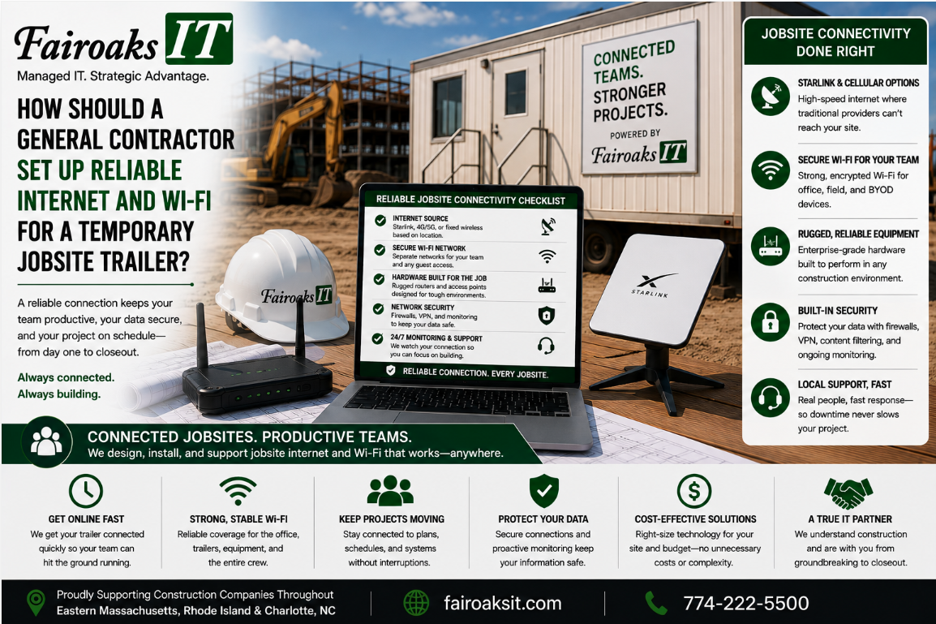
A general contractor should set up a temporary jobsite trailer using the same basic IT standards as a permanent office. At Fairoaks IT, that typically means a portable technology rack with a business-grade firewall, network switch, and mini battery backup, connected to the most appropriate internet service available at that particular jobsite.
The internet connection might be cable, fiber, cellular, Starlink, or another solution. The right choice depends on three factors: required throughput, reliability, and cost.
Most importantly, the setup should be standardized and documented so it can be supported consistently—and moved to the next project when the job is finished.
Our philosophy is simple:
Treat a jobsite trailer like an office—because it is one.
- Treat the Jobsite Trailer Like an Office
Calling something “temporary” doesn't make the work happening inside it less important.
A construction trailer may be where project teams:
- Access drawings
- Upload jobsite photos
- Complete daily reports
- Communicate with the main office
- Access project-management systems
- Retrieve company files
- Work with subcontractors and other project stakeholders
When the trailer loses connectivity, those workflows can be interrupted.
That's why we don't recommend treating jobsite internet as an afterthought.
A superintendent shouldn't have to become the project's unofficial IT technician. The technology should be designed, documented, and supported just like technology at the company's main office.
That starts with creating a repeatable standard.
- Standardize the Jobsite Technology Stack
One of the biggest mistakes a contractor can make is building every new trailer differently.
One job gets one router. The next gets something completely different. Someone buys a switch from whatever store is nearby. Passwords aren't documented. Nobody knows exactly how the equipment is configured.
Eventually something stops working.
Now troubleshooting starts with figuring out what's actually there.
Fairoaks takes a different approach.
We deploy a standardized portable jobsite technology rack that typically includes:
- Business-grade firewall
- Network switch
- Mini battery backup
- Standardized configuration
- Documentation
Think of the approach as:
Rack → Protect → Connect → Move
Rack
Keep the core networking equipment together in a portable, repeatable configuration.
Protect
Use a business-grade firewall and appropriate security rather than treating the trailer like a home network.
Connect
Connect the standardized equipment to the best internet service available at that jobsite.
Move
When the construction project ends, the rack can be picked up and moved to the next project.
Instead of reinventing the network every time a project starts, the contractor has a technology standard that can follow the business from job to job.
- Don't Forget About Jobsite Power
Reliable internet doesn't help much if the networking equipment keeps losing power.
And power in construction trailers can be notoriously unreliable.
That's why the Fairoaks jobsite stack includes a mini battery backup for critical network equipment.
The objective isn't to keep the entire trailer running indefinitely during a power failure.
It's to provide protection for the core network equipment and help deal with the realities of temporary jobsite power.
This is an easy detail to overlook when setting up a trailer.
It's also an example of why construction experience matters when selecting an IT provider. A configuration that works perfectly well in a conventional office may need to be adapted for the realities of a construction site.
- Choose the Internet Connection Using Three Factors
There isn't one “best internet service” for every construction project.
The best solution is the one that fits the location and the contractor's requirements.
Fairoaks evaluates jobsite internet using three primary factors:
- Required Throughput
What will employees actually be doing over the connection?
A trailer that primarily handles email has different requirements from one where employees regularly work with large drawings, photos, cloud applications, and other project information.
- Reliability
A fast connection isn't particularly valuable if it's frequently unavailable.
Consider how dependable each available option is at that specific location.
- Cost
Finally, compare the available solutions against what the project actually requires.
The framework is:
Throughput → Reliability → Cost
Don't automatically select a technology because it's the newest option—or the cheapest.
Select the connection that best meets the project's operational requirements.
- Be Prepared to Get Creative With Jobsite Internet
Sometimes setting up construction-site internet is easy.
You call the internet service provider, schedule the installation, and the provider puts a router in the trailer.
Other times, it takes considerably more creativity.
Fairoaks has encountered both.
We've mounted Comcast or Verizon equipment on temporary jobsite telephone poles when that was the practical way to bring service onto a site.
We've worked with neighboring businesses to obtain access to their utility closets or arrange connectivity when conventional service wasn't practical.
We've deployed solar-powered wireless modems.
We've used Starlink.
We've worked with cellular and wireless options.
And we've had plenty of sites where the conventional ISP installation was exactly what was needed.
The lesson is important:
Don't start with the technology. Start with the jobsite.
Determine what's available, what the project requires, and what will provide an appropriate combination of throughput, reliability, and cost.
Then design the solution.
- Document the Setup So Support Doesn't Start From Scratch
Standard equipment is only part of the solution.
The configuration needs to be documented.
Without documentation, an IT problem at a remote jobsite can turn into an investigation:
What equipment is there?
Which ISP is providing service?
How is everything connected?
How is the firewall configured?
Was this trailer set up differently from the others?
Who changed something?
A standardized and documented environment makes those questions easier to answer.
For contractors operating multiple jobs simultaneously, the objective should be:
Standard Equipment → Standard Configuration → Documentation → Repeatable Support
That makes troubleshooting more efficient and reduces dependence on whoever happens to remember how a particular trailer was assembled.
- Plan for the Entire Life of the Jobsite
A construction trailer has something a normal office often doesn't: a known end.
Eventually, the project finishes.
That should be part of the technology plan from the beginning.
Fairoaks approaches the lifecycle as:
Build → Deploy → Support → Retrieve → Redeploy
Build
Create a standardized technology package.
Deploy
Install it at the new jobsite and connect it to the best available internet service.
Support
Document and support the environment throughout the project.
Retrieve
When the project ends, recover the reusable technology.
Redeploy
Move it to the next project and repeat the process.
This turns the networking equipment into a reusable company asset rather than a collection of miscellaneous technology abandoned or forgotten at the end of each project.
Real-World Example: 75% Fewer Jobsite Communication Issues
Fairoaks recently took over IT support for a 40-person construction company running multiple projects throughout Eastern Massachusetts, Rhode Island and Charlotte, North Carolina.
The contractor was struggling with reliable communication between its jobsites and the rest of the company.
Technical problems meant field personnel couldn't consistently upload daily reports and jobsite photos. Keeping employees supplied with the latest drawings was also challenging.
When Fairoaks reviewed the environment, we discovered there wasn't a consistent standard for setting up the company's jobsite trailers.
Different trailers had different equipment.
They had different configurations.
Documentation was lacking.
That made problems both more frequent and more difficult to troubleshoot.
There was another issue: some trailers weren't using the most suitable internet service available at their locations.
Fairoaks worked with the contractor to develop and document a jobsite technology standard tailored to the company's operations.
The standard was then deployed consistently across its jobsites.
The result was a 75% reduction in jobsite communication issues.
The improvement wasn't the result of buying one magic router or switching every project to one particular ISP.
The contractor developed a repeatable technology standard for its jobsites.
Jobsite Trailer Technology Checklist
Before opening the next project, ask these questions:
- What internet services are actually available at this location?
- How much throughput will the jobsite realistically require?
- Which option offers the right balance of reliability and cost?
- Is there a business-grade firewall?
- Is the networking equipment protected from unreliable trailer power?
- Is the equipment standardized with our other jobsites?
- Is the configuration documented?
- Can our IT provider remotely support the environment?
- Can field employees reliably access the drawings, reports, photos, and systems they need?
- What happens to the equipment when the project ends?
If the answer to several of those questions is “we'll figure it out when we get there,” there's an opportunity to improve the process.
Reliable Jobsite Internet Is a Process, Not a Product
There's no single router, ISP, satellite service, or wireless technology that solves every construction company's jobsite connectivity problems.
The better approach is to establish a repeatable process:
Standardize the technology. Evaluate the location. Choose the right connection. Document the configuration. Support it. Then reuse it on the next project.
Fairoaks IT helps construction companies throughout Eastern Massachusetts, Rhode Island and Charlotte, North Carolina design and support technology for offices, remote employees, and temporary jobsites.
Our experience includes conventional ISP connections, cellular and wireless solutions, Starlink, unusual installation environments, and standardized portable jobsite networking equipment.
And when a project ends, we don't want the contractor starting from zero at the next one.
Pick up the rack, move it to the next job, connect it, and get back to building.