
Related Fairoaks resources: Protecting your business from data disasters | Managed security services | Cloud computing and backup considerations
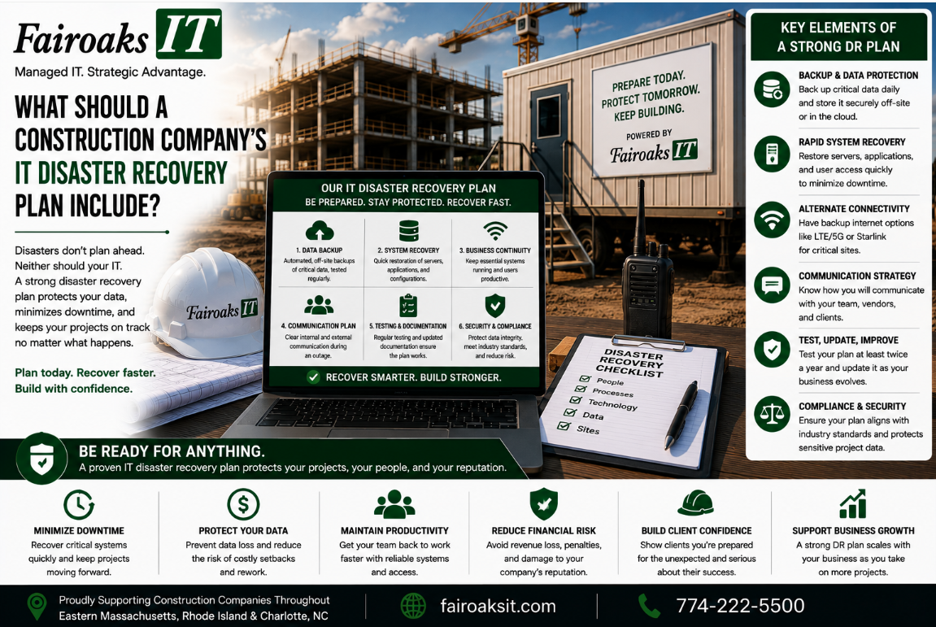
A construction company's IT disaster recovery plan should answer at least five questions: what systems are critical, what data must be protected, how quickly systems need to be restored, who is responsible for recovery, and how the plan will be tested.
For a general contractor, disaster recovery isn't just about backing up an office server. The plan may need to account for project files, drawings, construction applications, Microsoft 365, remote employees, and multiple active jobsites.
A practical framework is:
Identify → Protect → Recover → Communicate → Test
The goal isn't simply to say, “We have backups.”
The goal is to know:
If an important system becomes unavailable tomorrow morning, how will the company continue operating and how will it recover?
- Identify the Systems and Information the Business Can't Operate Without
Before choosing backup technology, identify what actually matters to the business.
Ask department leaders:
“What technology would create a serious operational problem if you couldn't use it tomorrow?”
For a general contractor, that list might include:
- Project-management systems
- Drawings
- CAD/BIM information
- Estimating applications
- Accounting systems
- Company files
- Microsoft Teams
- SharePoint
- Jobsite photos
- Daily reports
- Servers
- Construction-specific applications
Depending on the contractor, specialized applications might include systems such as Sage/Timberline, Bluebeam, AutoCAD, On-Screen Takeoff, ConEst/IntelliBid, Bid2Win, or Trimble.
Don't assume every system has the same importance.
Instead, classify them.
Tier 1 — Business Critical
Systems where an extended outage would significantly interfere with operations.
Tier 2 — Important
Systems employees need, but where a temporary outage may be manageable.
Tier 3 — Noncritical
Systems that can remain unavailable longer without seriously affecting operations.
This creates the first part of the disaster-recovery plan:
System → Business Function → Priority
Technology should be prioritized according to its importance to the business.
- Determine What Data Must Be Protected
Once critical systems have been identified, determine what information needs protection.
Construction companies can have information distributed across many locations and platforms.
For example:
| Business Function | Information or Platform |
| Project Management | Procore or similar platform |
| Drawings | Bluebeam |
| CAD/BIM | Autodesk platforms |
| Company Files | SharePoint or file storage |
| Communication | Microsoft Teams / Email |
| Accounting | Accounting/ERP platform |
| Field Operations | Daily reports and jobsite photos |
There may also be information stored on:
- Office servers
- Employee computers
- Cloud applications
- File-sharing platforms
- Mobile devices
- Other line-of-business systems
A disaster-recovery plan needs to establish where important information actually lives.
Use:
Data → Location → Protection → Owner
What is the information?
Where is it stored?
How is it protected?
Who is responsible for making sure that protection works?
If nobody can confidently answer those four questions, there's a gap in the recovery plan.
- Define How Much Data the Company Can Afford to Lose
This is where disaster recovery becomes a business conversation rather than an IT conversation.
Imagine a system fails.
Would losing the last 24 hours of information be acceptable?
What about 4 hours?
One hour?
Almost nothing?
The answer can differ by system.
This requirement is commonly described as the Recovery Point Objective, or RPO.
In plain English:
How much recent data could we lose and still recover acceptably?
Don't allow IT to answer this question alone.
The people running the business need to decide.
For one system, losing a day's changes might be inconvenient but manageable.
For another, it could create a serious operational problem.
The required recovery point affects how the system should be protected.
A useful discussion is:
System → Acceptable Data Loss → Protection Required
The important part isn't memorizing the acronym.
It's putting an actual number on the business requirement.
- Define How Long Each System Can Be Unavailable
The next question is different:
How long can we operate without this system?
This is commonly called the Recovery Time Objective, or RTO.
Again, make it concrete.
Could the company tolerate:
- 1 hour?
- 4 hours?
- 8 hours?
- 24 hours?
- Several days?
Different systems can have different answers.
For example, a system central to active projects might deserve a much shorter recovery target than a noncritical internal resource.
Don't accept:
“We need everything back as soon as possible.”
Of course you do.
But “as soon as possible” isn't a measurable recovery requirement.
Instead, build a table:
| System | Maximum Acceptable Data Loss | Target Recovery Time |
| Critical System #1 | ___ | ___ |
| Critical System #2 | ___ | ___ |
| Critical System #3 | ___ | ___ |
| Important System #1 | ___ | ___ |
Now the contractor and IT provider can design protection around actual business expectations.
- Don't Confuse Backup With Disaster Recovery
Having a backup is important.
But a backup by itself isn't a complete disaster-recovery plan.
A backup answers:
“Do we have another copy of the information?”
Disaster recovery asks:
“How do we restore the business operation?”
Those aren't the same question.
A company could theoretically have all of its data backed up and still encounter significant problems if nobody knows:
- Which system should be restored first
- Where it will be restored
- Who performs the recovery
- How long restoration should take
- What employees do while systems are unavailable
- How the company verifies the restored system works
That's why the process should be:
Protect → Restore → Verify → Resume
Protect
Maintain the appropriate protection for the information and system.
Restore
Know how the system or data will actually be recovered.
Verify
Confirm that the recovered information and systems work correctly.
Resume
Return employees to normal business operations.
A backup isn't successful merely because a system says the backup job completed.
The real test is whether the company can recover what it needs.
- Plan for More Than Ransomware
Cyberattacks deserve attention, but they're not the only reason a contractor may need to recover systems or data.
A disaster-recovery plan should consider different scenarios.
For example:
Hardware or System Failure
A critical system stops functioning.
Cybersecurity Incident
Systems or information become unavailable or untrustworthy because of a security event.
Accidental Deletion or Change
Someone deletes or changes important information.
Internet or Connectivity Failure
Employees can't reach systems they need.
Power Problem
A location loses power or experiences conditions that disrupt equipment.
Physical Site Problem
Employees can't use the normal office or another location.
Cloud or Application Availability Problem
A third-party platform employees depend on becomes unavailable.
Not every scenario requires the same response.
That's why a useful disaster-recovery plan is based on business functions, not just a list of backup products.
- Include the Main Office and the Field
Construction companies have another consideration:
The business may be operating from multiple locations at the same time.
A contractor might have a main office plus several temporary jobsites throughout Massachusetts and Rhode Island.
That can actually create useful options—but only if they're planned.
For example, if the main office has a technology problem, what can remote employees still access?
If a jobsite loses internet access, what work can continue?
If an office-based system becomes unavailable, which field workflows are affected?
The disaster-recovery plan should account for:
Office → Remote Employees → Jobsites → Cloud Systems
These aren't independent environments.
They're connected.
A failure in one location or system can affect employees elsewhere.
- Create a Communication Plan Before There's an Emergency
During a significant IT incident, employees need answers.
At minimum:
- What happened?
- Who is affected?
- What should employees do?
- What should employees not do?
- Who is managing the incident?
- When will the next update be provided?
- Are there temporary workarounds?
Decide in advance who communicates with:
- Owners and executives
- Office employees
- Project managers
- Superintendents
- Outside IT providers
- Software vendors
- Other appropriate parties
A simple framework is:
Incident → Owner → Audience → Message → Update
Without a communication plan, technical problems can quickly become organizational confusion.
- Assign Recovery Responsibilities
A disaster-recovery document isn't particularly useful if every important task is assigned to:
“IT.”
Be specific.
For each critical system, identify:
- Business owner
- Technical owner
- Vendor, if applicable
- Recovery priority
- Recovery procedure
- Escalation contact
For example, if a construction application becomes unavailable, who contacts the software vendor?
If jobsite connectivity fails, who coordinates with the ISP?
If a server needs to be restored, who performs the recovery?
If employees need instructions, who communicates with them?
The plan should reduce uncertainty during an incident—not create another document employees have to interpret while the business is already disrupted.
- Test the Recovery Plan
A disaster-recovery plan that has never been tested contains assumptions.
Testing turns assumptions into evidence.
At least periodically, verify questions such as:
- Can important data actually be restored?
- Do the responsible people know what to do?
- Are contact details current?
- Are recovery priorities still correct?
- Have important systems changed?
- Are new cloud applications now business critical?
- Have old systems been retired?
- Do recovery expectations still match business requirements?
Document the results.
Then fix the gaps.
Use:
Test → Measure → Document → Improve
The goal isn't to prove that the plan is perfect.
The goal is to find problems during a controlled test instead of during a real emergency.
Real-World Lesson: Standardization Makes Problems Easier to Manage
Fairoaks recently took responsibility for IT support for a 40-person construction company operating multiple jobs throughout Eastern Massachusetts and Rhode Island.
The contractor was having frequent communication problems with its jobsite trailers.
Employees couldn't consistently upload daily reports and jobsite photos, and keeping field personnel supplied with the latest drawings was challenging.
When Fairoaks investigated, we found that different jobsite trailers had different equipment and configurations.
Documentation was lacking.
Some locations weren't using the most suitable available internet service.
While this wasn't a disaster-recovery project, it illustrates an important recovery principle:
Undocumented, inconsistent technology is harder to troubleshoot and restore.
Fairoaks worked with the contractor to develop and document a standardized jobsite technology approach and deploy it consistently.
The contractor experienced a 75% reduction in jobsite communication issues.
The lesson for disaster recovery is straightforward:
Standardization + Documentation = A More Supportable Environment
When something goes wrong, knowing what you have and how it's configured matters.
15 Questions Every Construction Disaster-Recovery Plan Should Answer
Use this checklist with your management and IT teams:
- Which systems are most critical to operations?
- Where does our important information live?
- How is that information protected?
- How much recent data can we afford to lose?
- How long can each critical system be unavailable?
- Who is responsible for restoring each system?
- Which system gets restored first?
- What happens if our main office is unavailable?
- What happens if a jobsite loses connectivity?
- How do remote employees continue working?
- What happens if a cloud application is unavailable?
- How will employees receive instructions during an incident?
- When did we last test a restore?
- When did we last test the overall recovery plan?
- What did the last test reveal that we need to improve?
If several answers are:
“We're not sure,”
you've identified exactly where to start.
How Quickly Should a Construction Company Recover From an IT Disaster?
There isn't one correct number.
A contractor shouldn't arbitrarily decide that every system must be restored within one hour—or assume that recovering everything within several days is acceptable.
Instead, establish requirements based on the business.
For every critical system, define:
RPO: How much data can we afford to lose?
RTO: How long can we afford to be without it?
Then make sure the technology, backup strategy, recovery process, and budget align with those expectations.
That creates a much more useful conversation than:
“Do we have backups?”
A Construction Disaster-Recovery Plan Should Be Measurable
Use the five-part framework:
Identify → Protect → Recover → Communicate → Test
Identify the systems and information that matter.
Protect them appropriately.
Recover according to defined business requirements.
Communicate clearly when something happens.
Test the process before you actually need it.
Fairoaks IT works with construction companies throughout Eastern Massachusetts and Rhode Island, including contractors with remote employees and multiple active jobsites.
Our construction experience includes remote access, jobsite connectivity, large-file workflows, construction applications, and standardized jobsite technology. Our average IT ticket response time is 12 minutes, and our average problem resolution time is 1.9 hours.
For one 40-person construction company, improving and standardizing its jobsite technology contributed to a 75% reduction in communication issues.
The disaster-recovery question every contractor should be able to answer isn't:
“Are we backed up?”
It's:
“If something important fails tomorrow, do we know exactly how we're going to keep operating and recover?”