

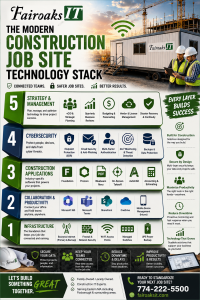
The Complete Technology Checklist
When a new construction project begins, most contractors focus on permits, equipment, staffing, and schedules. Unfortunately, technology often becomes an afterthought until someone can't connect to Procore, the internet goes down, or the printer won't work on the first day.
For construction companies with 20–75 computer users, every new job site should include 10–15 essential technology components before the first superintendent or project manager arrives. A properly planned IT deployment improves communication, protects sensitive project data, minimizes downtime, and keeps projects moving on schedule.
At Fairoaks IT, we've helped construction companies throughout Massachusetts and Rhode Island deploy secure, reliable technology for offices and job sites alike. Here's our checklist for setting up a successful construction trailer or field office.
- Plan Internet Connectivity Before the Trailer Arrives
The most common mistake we see is waiting until the trailer is delivered before ordering internet service.
Depending on the project location, installation could take several weeks.
Internet Options
Fiber Internet (Best Choice)
Fiber provides the fastest and most reliable connection for long-term projects where it's available. It's ideal for companies that regularly upload plans, collaborate in Microsoft Teams, or rely on cloud-based construction software.
Business Cable Internet
Cable internet offers good performance with quicker installation than fiber and is often an excellent option for shorter-term projects.
5G Business Internet
Modern 5G services have become an outstanding solution for temporary job sites. They deploy quickly and can provide excellent speeds when fiber isn't available.
Starlink
For rural or remote construction sites, Starlink has become a practical alternative when traditional internet providers cannot deliver service.
Questions to Ask Before Ordering Internet
- How many users will work from the trailer?
- Will project managers upload large drawing files daily?
- Will Procore and Foundation be used throughout the day?
- Are VoIP phones required?
- Is backup internet necessary?
The answers determine the type of connection your project needs.
- Build a Secure Job Site Network
A construction trailer isn't just a temporary office—it's an extension of your business network.
Treat it like one.
Every job site should include:
- Business-grade firewall
- Managed network switch
- Enterprise Wi-Fi access points
- Battery backup (UPS)
- Surge protection
- Secure network cabinet
Separate Wireless Networks
Not everyone should share the same Wi-Fi.
Create separate wireless networks for:
- Company employees
- Company-issued devices
- Guests
- Subcontractors
- Security cameras or IoT devices
Network segmentation improves both performance and security.
- Equip Your Field Team for Productivity
Today's field employees expect the same access they have in the office.
That means more than simply handing someone a laptop.
A typical job trailer should include:
- Business laptops
- Dual monitors
- Docking stations
- Smartphones
- Tablets
- Multifunction printers
- Portable scanners
- Webcam and headset for Teams meetings
Essential Software
Construction companies often rely on:
- Microsoft 365
- Microsoft Teams
- SharePoint
- OneDrive
- Procore
- Foundation
- Bluebeam Revu
- AutoCAD
- On-Screen Takeoff
All software should be fully configured before employees arrive on-site.
New users should be able to log in and begin working immediately—not spend half the day waiting for IT.
- Protect the Job Site Against Cyber Threats
Construction companies have become one of the fastest-growing targets for ransomware attacks.
Why?
Because they manage financial information, contracts, engineering drawings, payment schedules, and valuable project data.
Every new job site should include multiple layers of protection.
Device Security
- Endpoint Detection & Response (EDR)
- Automatic patch management
- Full-disk encryption
- Remote monitoring
Microsoft 365 Security
- Multi-Factor Authentication (MFA)
- Email protection
- Anti-phishing
- Safe Links and Safe Attachments
- Conditional Access policies
Physical Security
Technology security isn't just digital.
Protect equipment by using:
- Lockable network cabinets
- Cable locks for laptops
- Security cameras
- Asset inventory tracking
- Visitor procedures
If someone walks away with a laptop containing project data, encryption and remote management become critical.
- Standardize Every Job Site
The most successful construction companies don't reinvent their technology deployment every time they open a project.
They follow a repeatable process.
30 Days Before Opening
- Order internet service
- Schedule firewall configuration
- Prepare employee laptops
- Configure Microsoft 365 accounts
- Verify software licensing
One Week Before
- Test internet connection
- Configure Wi-Fi
- Install printers
- Verify cloud access
- Confirm remote monitoring
Installation Day
- Connect network equipment
- Test every workstation
- Verify Teams meetings
- Print test documents
- Confirm Procore access
- Test Foundation connectivity
First Week
- Train employees
- Review security procedures
- Verify backups
- Update asset inventory
- Confirm all software integrations
Using the same deployment checklist for every project reduces delays, minimizes support requests, and creates a consistent experience for your teams.
Job Site Technology Checklist
Before your next project begins, make sure you've completed each of these items.
Connectivity
- Business internet installed
- Backup internet available
- Business firewall configured
- Enterprise Wi-Fi operational
Devices
- Laptops configured
- Tablets deployed
- Smartphones enrolled
- Printers installed
Software
- Microsoft 365
- Teams
- SharePoint
- OneDrive
- Procore
- Foundation
- Bluebeam
- AutoCAD
Security
- MFA enabled
- EDR installed
- Device encryption active
- Email protection configured
- Backups tested
Operations
- User accounts created
- Asset inventory updated
- Emergency contacts documented
- Vendor support information available
Real-World Example
A commercial contractor preparing to launch three new projects within six months wanted every field office to operate exactly the same way.
Fairoaks IT developed a standardized deployment process that included preconfigured laptops, Microsoft 365, secure Wi-Fi, managed firewalls, cloud printing, and remote monitoring. Every trailer was operational on day one, allowing project managers to focus on construction instead of troubleshooting technology.
Standardization also simplified onboarding, reduced support calls, and made it easier to secure every location using the same cybersecurity policies.
Why Construction Companies Choose Fairoaks IT
Unlike many managed IT providers, Fairoaks IT (Construction Company IT Support | MA | RI | NC | SC - Fairoaks IT) understands the technology challenges construction companies face every day.
We support organizations using platforms such as Foundation, Procore, Bluebeam, AutoCAD, and On-Screen Takeoff while helping contractors improve cybersecurity, standardize job site deployments, and build long-term technology strategies through our vCIO services.
As a family-owned, locally owned company serving businesses throughout the Foxborough area and surrounding communities, we believe technology should help projects move faster—not create obstacles.
Ready to Standardize Your Next Job Site?
Opening a new construction site shouldn't require reinventing your IT process every time.
Whether you're launching one project or managing multiple active job sites, Fairoaks IT can help you design a secure, repeatable technology deployment that keeps your field teams connected, protected, and productive from day one.
Contact Fairoaks IT to schedule a construction technology assessment and learn how we help contractors simplify IT while supporting the software and workflows that keep projects moving.
Construction Company IT Support | MA | RI | NC | SC - Fairoaks IT