

Related Fairoaks resources: Construction company IT support | Cloud computing and secure data access | Essential IT on your construction job site
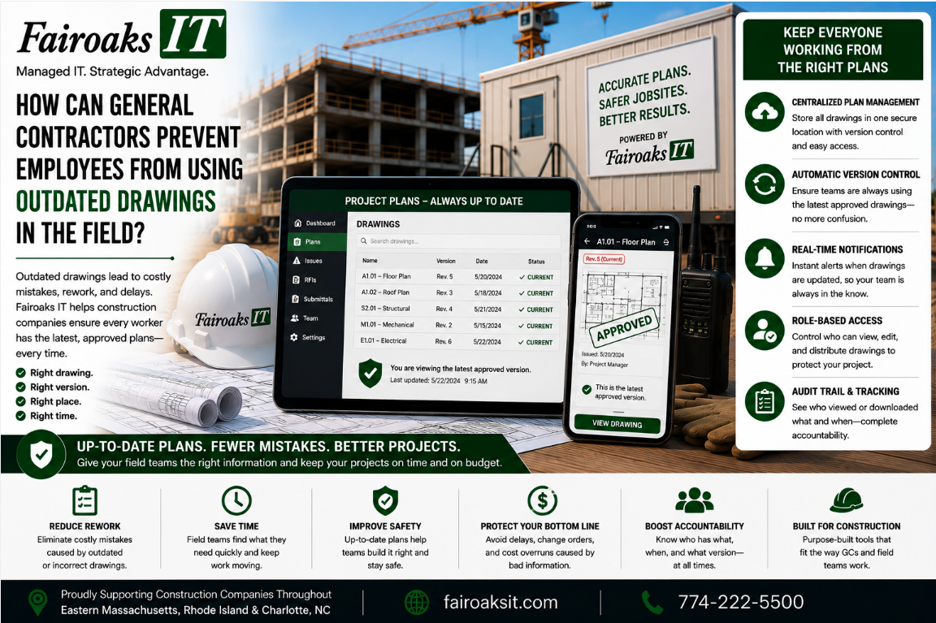
General contractors can reduce the risk of employees using outdated drawings by establishing one authoritative location for current documents, controlling permissions, standardizing how revisions are published, making field access reliable, and training employees to verify the current version before use.
The biggest mistake is allowing drawings to live simultaneously on an office file server, employee laptops, Dropbox folders, USB drives, email attachments, and other uncontrolled locations.
A better five-step framework is:
Store → Control → Publish → Access → Verify
The objective isn't simply to make drawings available.
It's to make the current drawing easy to find and an outdated drawing difficult to mistake for the current one.
- Establish One Authoritative Location for Current Drawings
The first question every contractor should be able to answer is:
“Where does the official current drawing live?”
If different employees give different answers, there's already a problem.
Many contractors have accumulated file-storage methods over time.
Drawings may exist on:
- An office file server
- An older Windows server
- A Synology
- Local computers
- Dropbox folders
- USB drives
- Email attachments
- Project-management platforms
- Drawing-management platforms
The problem isn't simply that copies exist.
Copies are sometimes unavoidable.
The problem occurs when employees don't know which location contains the authoritative version.
Commercial construction companies today may use a technology environment such as:
| Function | Typical Platform |
| Project Management | Procore |
| Drawings | Bluebeam |
| CAD/BIM | Autodesk Construction Cloud |
| Company Files | SharePoint |
| Communication | Microsoft Teams |
The exact technology will vary from contractor to contractor.
The principle should not:
For each type of project information, define where the authoritative version belongs.
If drawings are managed in one approved system, employees shouldn't have to search five other places to determine which version is current.
- Control Who Can Publish and Change Information
Once you've established where current information belongs, determine who can change it.
Not everyone who needs to view a drawing necessarily needs permission to publish or modify the official version.
Think about access in terms of roles:
View → Edit → Publish → Administer
View
Who needs to see the information?
Edit
Who is allowed to make changes?
Publish
Who has authority to make a revised document available as the current version?
Administer
Who manages the platform, permissions, and overall workflow?
Clear responsibilities reduce ambiguity.
They also make it easier to determine what happened if there's ever a question about when a document changed or who had access to it.
The goal is not to create unnecessary bureaucracy.
It's to establish enough control that field employees can trust the information they're being given.
- Create a Consistent Revision and Publishing Process
Technology alone won't solve version-control problems.
The company needs a process.
When a revised drawing becomes available, what happens?
Who receives it?
Who publishes it?
What happens to the previous version?
How does the field know something changed?
How can an employee confirm which version is current?
Those questions should have consistent answers.
A simple workflow is:
Receive → Review → Publish → Notify → Archive
Receive
The revised information enters the company's established process.
Review
The appropriate person confirms that it is ready to be distributed.
Publish
The current version is placed in the authoritative location.
Notify
People who need to know about the revision are notified through the company's established process.
Archive
Superseded information is handled in a way that prevents it from being casually mistaken for the current version.
The exact workflow will depend on the contractor and the software being used.
What's important is consistency.
A project team shouldn't have to guess whether the latest drawing arrived by email, Teams, Dropbox, USB drive, or some other method.
- Stop Email From Becoming the Drawing Management System
Email is excellent for communication.
It can be problematic as the authoritative repository for project information.
Imagine a revised drawing is emailed to 10 people.
Now there may be 10 downloaded copies.
One employee saves it to a desktop.
Another puts it in a project folder.
Someone forwards it.
Another employee continues using the version downloaded yesterday.
The question quickly becomes:
Which copy is current?
The same problem can occur with unmanaged Dropbox folders or USB drives.
The answer isn't necessarily to prohibit every file attachment.
It's to make sure employees understand:
An attachment or downloaded copy isn't automatically the authoritative source.
The project workflow should always point employees back to the approved location for current information.
- Make the Correct Drawing Easy to Access From the Jobsite
This is where IT infrastructure becomes part of document control.
You can design an excellent drawing-management process at headquarters, but it won't work well if the superintendent can't reliably access it from the field.
Field employees need appropriate:
- Internet connectivity
- Wi-Fi
- Devices
- Accounts
- Permissions
- Application access
- Technical support
At Fairoaks, we treat a jobsite trailer as an office—because it is one.
Our standardized jobsite technology approach typically uses a portable rack containing a:
- Business-grade firewall
- Network switch
- Mini battery backup
- Standardized configuration
- Documented setup
The internet connection is selected based on the individual site.
We use a three-factor framework:
Throughput → Reliability → Cost
The specific connection might be conventional cable or fiber, wireless/cellular, Starlink, or another appropriate solution.
Why does that matter for drawing control?
Because if the approved system is difficult or slow to reach, employees have an incentive to save local copies “just in case.”
Those local copies can eventually become old copies.
Good document control depends on reliable access.
- Reduce Dependence on Office File Servers for Field Workflows
Many construction companies still have important files on an office server or NAS.
Then remote employees connect using methods such as:
- VPN
- Remote Desktop
- Dropbox synchronization
- Other file-transfer workarounds
Those technologies can have legitimate uses.
But contractors should ask whether that architecture is still appropriate for each field workflow.
Consider this path:
Jobsite → Internet → VPN → Office → File Server → Large Drawing
Now compare it with a platform designed to provide authorized distributed access to the appropriate information.
The right architecture depends on the contractor and workload.
But the question should be asked:
Does this information still need to live on the office server?
Don't migrate something merely because “cloud is better.”
And don't leave it where it is merely because “that's how we've always done it.”
Use:
Workload → Users → Location → Access Requirements → Platform
Then choose the appropriate solution.
- Give Field Employees a Simple Verification Habit
Even with good technology and processes, employees should know how to verify what they're using.
Before relying on a critical drawing, the field employee should be able to confirm information such as:
- Project
- Drawing identifier
- Revision
- Date
- Status
- Authoritative location
The exact verification method will depend on the contractor's platform and procedures.
The principle is:
Don't rely on filename recognition alone.
A file called:
FINAL-DRAWING.pdf
isn't particularly reassuring.
Neither is:
FINAL-DRAWING-v2-USE-THIS-ONE.pdf
If employees routinely see filenames like that, the company may have a process problem disguised as a naming problem.
The approved system should make it straightforward to determine what information is current.
- Train Employees on Where NOT to Get Current Drawings
Most companies train employees on what they should do.
It's also useful to explain what they should not treat as authoritative.
For example:
Don't assume the current drawing is:
- The one saved on your desktop
- The one somebody emailed last week
- The copy on a USB drive
- The one in an old project folder
- The one another employee happened to send you
Instead:
Go to the company's defined authoritative location and verify the current version.
That's a simple rule employees can remember.
It also makes training easier because the company isn't asking people to memorize a complicated technical process.
The message is:
Know where the truth lives.
- Make IT Support Part of the Process
If field employees can't access the approved platform, they need help quickly.
Otherwise, they create workarounds.
A superintendent who can't retrieve a drawing isn't thinking:
“I should preserve the integrity of our information architecture.”
They're thinking:
“I need that drawing.”
If the approved workflow doesn't work, someone may email a copy.
Now the immediate problem is solved—but another uncontrolled copy has entered the environment.
That's why IT support and document-control processes are connected.
At Fairoaks IT, our average ticket response time is 12 minutes, and our average problem resolution time is 1.9 hours.
When the approved technology is supported effectively, employees have less reason to bypass it.
Real-World Example: Keeping Field Teams Better Connected to Current Information
Fairoaks recently took responsibility for IT support for a 40-person construction company operating multiple jobs throughout Eastern Massachusetts, Rhode Island and Charlotte, North Carolina.
The contractor had challenges maintaining reliable communication with its jobsite trailers.
Employees couldn't consistently upload daily reports and jobsite photos.
Keeping the field updated with the latest drawings was also a challenge.
When Fairoaks investigated, we found that the company's jobsite technology lacked consistency.
Different trailers had different equipment.
Configurations varied.
Documentation was lacking.
Some locations weren't using the most suitable internet service available.
Fairoaks worked with the contractor to develop and document a standardized jobsite technology approach tailored to its requirements.
That standard was then deployed consistently.
The contractor experienced a 75% reduction in jobsite communication issues.
It's important not to overstate what that number means.
The 75% reduction wasn't measured specifically as a reduction in drawing-version errors.
It reflects the broader improvement in jobsite communication after the technology environment was standardized.
But the project illustrates an important principle:
Field employees can't reliably use current information if the technology connecting them to that information is unreliable.
10 Questions to Ask About Drawing Version Control
Use these questions to evaluate your current process:
- Where is the authoritative version of every current drawing stored?
- Would our superintendents all give the same answer to Question #1?
- Who is authorized to publish revised drawings?
- What happens to superseded versions?
- How are field employees notified when information changes?
- Can field employees easily verify the current revision?
- Are employees using email, Dropbox, USB drives, or local folders as unofficial repositories?
- Can jobsites reliably access the approved platform?
- What happens when a superintendent can't access a drawing?
- Does our IT provider understand the complete workflow from the office to the field?
Several uncertain answers indicate that the process deserves attention.
A Five-Step Framework for Preventing Outdated Drawings
General contractors don't need to solve this with one particular technology.
They need a consistent process.
Use:
Store → Control → Publish → Access → Verify
Store
Define the authoritative location.
Control
Determine who can view, modify, and publish information.
Publish
Use a consistent process for revisions.
Access
Make sure field employees can reliably reach the information.
Verify
Give employees a simple way to confirm they're using the current version.
Then support the infrastructure underneath the process.
That includes the jobsite internet connection, networking equipment, employee devices, accounts, permissions, and applications.
The Goal Isn't File Sharing. It's Information Confidence.
Construction companies don't simply need a way to send drawings from Point A to Point B.
The field needs confidence that the information being used is current and authoritative.
That means reducing ambiguity.
One source of truth.
Controlled publishing.
Reliable field access.
Clear verification.
Responsive support.
Fairoaks IT works with construction companies throughout Eastern Massachusetts, Rhode Island and Charlotte, North Carolina, including contractors operating multiple temporary jobsites.
Our construction experience includes jobsite connectivity, remote access, large-file sharing, and applications such as Bluebeam, AutoCAD, Sage/Timberline, On-Screen Takeoff, ConEst/IntelliBid, Bid2Win, and Trimble. Our average IT ticket response time is 12 minutes, and our average problem resolution time is 1.9 hours.
For one 40-person construction company, standardizing the technology supporting multiple jobsites contributed to a 75% reduction in jobsite communication issues.
The best question for a superintendent shouldn't be:
“Which copy do I use?”
It should be:
“Where do I go to get the current drawing?”
And everyone on the project should know the answer.